

I’ve been building gnhf, a CLI that orchestrates coding agents to get work done overnight. The name stands for “good night, have fun”, so the TUI leans into the bedtime metaphor: a centered status panel sitting under a slow-twinkling starfield, with a moon strip tracking each iteration.
I wanted the background to feel alive without ever stealing attention from the actual run state.
I ended up implementing the renderer with no TUI framework, no “small game engine” - just a small cell grid, a seeded random number generator, and an ANSI diff at 5 FPS.
This post walks through how it works. The whole renderer is a few hundred lines of TypeScript and you can read it in src/renderer.ts and src/utils/stars.ts.
Why no framework
I actually started with Ink. It’s the obvious choice for a Node TUI - React mental model, flexbox layout, good ergonomics. For a static panel it would have been fine.
The problem showed up the moment I added the starfield. Ink re-renders through React’s reconciler: every animation tick walks a virtual DOM, diffs it, and hands the result to Yoga for layout. For a 120x80 grid where ~30 cells change per frame, that’s a lot of machinery to move a handful of characters. I could see the CPU spike on every tick, and on slower terminals the redraw lagged behind the 200ms tick.
The actual problem is very simple. The TUI is a fixed grid of cells - no scrolling, no input widgets, no focus, no flexbox. What I needed was a 2D Cell[][] buffer, a function that diffs two of them, and an ANSI emitter for the diff. That’s about 100 lines, it has zero per-frame allocation overhead beyond the buffer itself, and it scales with changed cells instead of total cells. At 5 FPS with 30-cell deltas, the renderer is essentially free.
We shouldn’t assume a framework is needed before analyzing the problem we’re trying to solve. Frameworks should earn their way into our projects.
Picking the star characters
The first thing I tried was the obvious one: *. It looked terrible. Asterisks are loud, they sit on the baseline, and a screen full of them reads as code, not sky.
What I actually wanted was the visual weight of a real night sky - mostly faint dots, a few brighter accents, nothing that competes with the text. I went through the Unicode block of misc symbols and settled on a small palette, weighted toward the quietest characters:
const STAR_CHARS = [
  "·",
  "·",
  "·",
  "·",
  "·",
  "·",
  "✧",
  "⋆",
  "⋆",
  "⋆",
  "°",
  "°",
] as const;
The duplication is the weighting. When I pick a character with Math.floor(rand() * STAR_CHARS.length), half the stars come out as middle dots, a quarter as four-pointed stars, the rest split between the bright ✧ and the small ring °. That ratio is what makes it read as a sky instead of a pattern.
A few things that mattered:
All single-width characters. Wide graphemes wreck a fixed cell grid - one stray emoji and every column to its right shifts.
All visually centered in their cell.
*sits low;·and⋆sit in the middle and don’t fight the line height.No characters that look like punctuation in context.
.and'would have been disastrous next to the prompt text.
Animating the stars
Real stars don’t blink in unison. The cheapest way to fake that is to give every star its own clock.
When I generate the field, each star gets a random phase offset and a random period somewhere between 10 and 25 seconds:
stars.push({
  x,
  y,
  char: STAR_CHARS[charIdx],
  phase: rand() * Math.PI * 2,
  period: 10_000 + rand() * 15_000,
  rest,
});
rest is the state the star sits in most of the time - mostly bright, sometimes dim, occasionally hidden. The hidden ones are important: they’re empty cells that occasionally blink into view, which is what stops the field from looking static.
The animation itself is a tiny state machine driven by wall-clock time. Each star is in its rest state for ~95% of its period, then runs through a brief blink envelope:
export function getStarState(star: Star, now: number): StarState {
  const t =
    ((now % star.period) / star.period + star.phase / (Math.PI * 2)) % 1;
  if (t > 0.05) return star.rest;
  if (star.rest === "bright" || star.rest === "hidden") {
    const opposite = star.rest === "bright" ? "hidden" : "bright";
    if (t > 0.0325) return "dim";
    if (t > 0.0175) return opposite;
    return "dim";
  }
  if (t > 0.025) return "bright";
  return "dim";
}
The shape is dim → opposite → dim → rest. A bright star fades down before it disappears; a hidden star fades up before it shows. That little three-step ramp is the difference between “twinkling” and “flickering”. Sharp on/off transitions look like rendering bugs.
Three states map cleanly to ANSI styles, no truecolor needed:
function starStyle(state) {
  if (state === "bright") return "bold";
  if (state === "dim") return "dim";
  return "normal";
}
bold and dim are SGR 1 and SGR 2, supported by every terminal I care about. Hidden stars render as a literal space.
One detail worth calling out: the star positions come from a seeded PRNG (pseudo-random number generator - a function that produces a deterministic sequence of “random” numbers from a starting seed). I used a Park-Miller LCG, which is one multiply and one modulo per call:
let s = seed;
const rand = () => {
  s = (s * 16807 + 0) % 2147483647;
  return s / 2147483647;
};
Determinism matters here - if the field regenerated freshly on every frame, the stars would jump around. Seeding it means the same terminal size always produces the same sky. Math.random() would have worked for the randomness, but it isn’t seedable in Node, so a few lines of LCG was the simpler answer.
Avoiding the main content
Another interesting problem was making sure the stars never overlapped the actual content we need to display.
The naive approach is to render stars under everything and overdraw. That works visually but it’s wasteful, and it creates a flicker risk if the diff order is wrong.
Instead, I split the screen into three regions and only generate stars where they’re allowed:
┌────────────────────────────────────┐
│      top stars  (full width)       │
│                                    │
│ side  │   content panel   │ side   │
│ stars │                   │ stars  │
│       │   (no stars)      │        │
│                                    │
│     bottom stars (full width)      │
└────────────────────────────────────┘
The content panel is a fixed CONTENT_WIDTH. Above and below it, stars get the full terminal width. To either side, only the margin gets stars. The frame builder stitches them together row by row:
for (let i = 0; i < contentRows.length; i++) {
  const left = renderSideStarsCells(sideStars, i, 0, sideWidth, now);
  const center = centerLineCells(contentRows[i], CONTENT_WIDTH);
  const right = renderSideStarsCells(
    sideStars,
    i,
    terminalWidth - sideWidth,
    sideWidth,
    now,
  );
  frame.push([...left, ...center, ...right]);
}
Three independent star fields - top, bottom, sides - each with their own seed. The side field gets generated at full terminal width but placeStarsInCells only emits stars whose x falls inside the requested column range, so a star that would have landed under the panel just doesn’t exist.
The win here is that there’s no z-ordering, no occlusion test, no overdraw. Each cell in the final frame has exactly one writer. When the panel grows or shrinks (the layout drops sections when the terminal is short), the regions recompute and the stars follow. No leaks, no half-overwritten characters.
Diffing frames
5 FPS doesn’t sound like much, but a 120x80 terminal is 9,600 cells. Repainting all of them every 200ms gives you a visible flicker on slow terminals and burns bandwidth over SSH.
So the renderer keeps the previous frame in memory, builds the next one as a 2D array of Cell objects, and only emits ANSI for cells that actually changed:
export function diffFrames(prev: Cell[][], next: Cell[][]): Change[] {
  const changes: Change[] = [];
  const rows = Math.min(prev.length, next.length);
  for (let r = 0; r < rows; r++) {
    const prevRow = prev[r];
    const nextRow = next[r];
    const cols = Math.min(prevRow.length, nextRow.length);
    for (let c = 0; c < cols; c++) {
      const n = nextRow[c];
      if (n.width === 0) continue;
      const p = prevRow[c];
      if (p.char !== n.char || p.style !== n.style || p.width !== n.width) {
        changes.push({ row: r, col: c, cell: n });
      }
    }
  }
  return changes;
}
Cell is the unit the whole renderer trades in:
export interface Cell {
  char: string;
  style: Style; // "normal" | "bold" | "dim"
  width: number; // 1 normal, 2 wide, 0 continuation
}
The width: 0 field deserves a little more attention, because it’s where a real bug used to live.
The moon strip uses emoji - 🌑🌒🌓🌔🌕🌖🌗🌘. In every modern terminal these render two columns wide, but JavaScript sees them as one grapheme made of one or two UTF-16 code units. If you naively put one moon in one cell of your buffer, your buffer thinks column 5 is occupied but the terminal has actually painted columns 5 and 6. Every cell to the right of the moon is now off by one, and the strip smears into the stars next to it.
The fix is to make the buffer agree with the terminal. A wide grapheme occupies two adjacent cells: the first holds the character with width: 2, the second is a placeholder with width: 0 and an empty char. The diff skips continuation cells outright:
if (n.width === 0) continue;That single line is what keeps the moon strip aligned. When the active moon advances one phase, the diff sees exactly one changed cell, emits one cursor move and one character, and the continuation slot stays untouched. Without it we’d either double-emit (paint the moon, then paint a stray space over its right half) or get half-rendered moons on frames where only one of the two cells “changed”.
The same mechanism handles CJK characters that show up in agent output. No special case for emoji, no special case for Chinese - one width field, one rule.
Emitting the diff is also boring on purpose. Move the cursor with CSI row;col H, set the style if it changed, write the character, advance the cursor cursor in memory:
for (const { row, col, cell } of changes) {
  if (row !== cursorRow || col !== cursorCol) {
    result += `\x1b[${row + 1};${col + 1}H`;
  }
  if (cell.style !== currentStyle) {
    result += "\x1b[0m";
    if (cell.style === "bold") result += "\x1b[1m";
    else if (cell.style === "dim") result += "\x1b[2m";
    currentStyle = cell.style;
  }
  result += cell.char;
  cursorRow = row;
  cursorCol = col + cell.width;
}
Two small optimizations carry most of the win:
Skip the cursor move if it’s already there. Adjacent changed cells become bare characters with no escape sequence in between.
Don’t re-emit style codes that haven’t changed. A run of bright stars on the same row is one
\x1b[1mfollowed by the characters.
In practice a typical frame in steady state is maybe 10-30 cell changes - a handful of stars transitioning, the elapsed timer ticking, and the active moon advancing one phase. That’s a few hundred bytes per frame, comfortably under any terminal’s redraw budget.
The render loop is one line:
this.interval = setInterval(() => this.render(), TICK_MS); // TICK_MS = 200render() builds a frame, diffs it against the previous one, writes the diff, stores the new frame as the previous. That’s the whole engine.
Wrapping up
The starfield ended up looking really nice and gives me the feeling of zen.
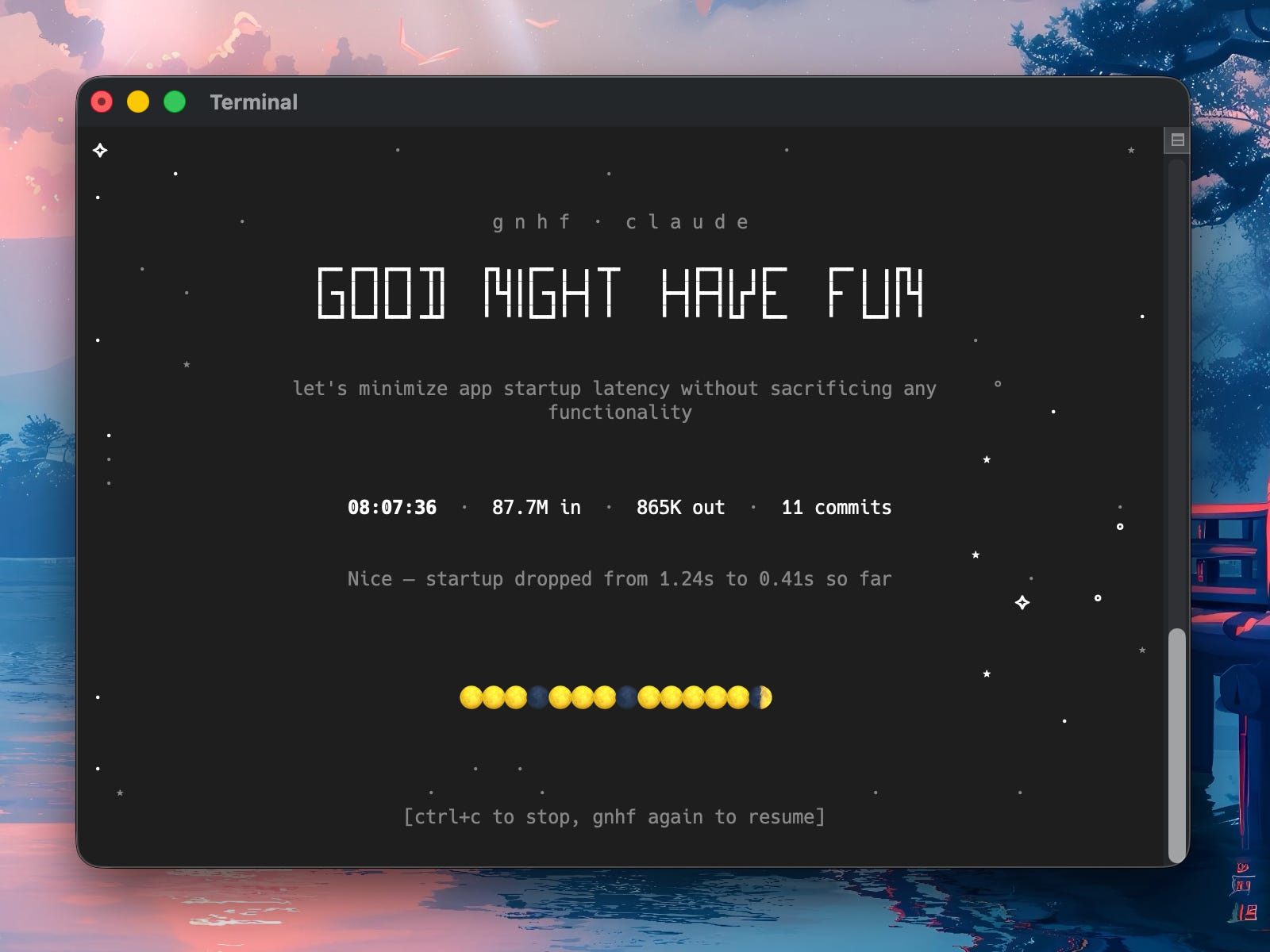
If you want to poke at it, the code is at github.com/kunchenguid/gnhf. The two files worth reading are src/utils/stars.ts (~80 lines) and src/renderer-diff.ts (~120 lines). Have fun!
Who said engineers cannot be artists?